


Table of Contents
- Why “ADHD-Friendly” Marketing Doesn’t Tell the Whole Story About Work Tools
- The Real Question: What Executive Function Gap Does This Fill?
- Why I Layer Similar Tools Instead of Choosing One
- The Overlooked Power of Visual Task Management
- How AI Tools Reduce Decision Fatigue (When Used Right)
- The Tools I Actually Use and Why
- What Makes a Tool Actually Worth Using
- The Implementation Reality Nobody Talks About
- What I’d Tell Someone Starting From Scratch
- Frequently Asked Questions
- ADHD-friendly work tools should address specific executive function gaps rather than promise generic productivity improvements
- Layering complementary tools for different contexts reduces cognitive load more effectively than forcing one tool to handle everything
- Visual task management externalizes mental structure, allowing ADHD brains to use cognitive energy for actual work instead of maintaining mental models
- AI tools work best as scaffolding that handles micro-decisions and reduces decision fatigue, not as replacements for strategic thinking
- Implementation rituals matter more than tool features—consistent, repeatable patterns make tools sustainable long-term
- Tool evaluation should focus on three criteria: Does it reduce cognitive load? Does it integrate with existing systems? Does it address a specific executive function challenge?
When choosing adhd friendly work tools, I don’t use just one productivity app.
I use three scheduling tools. Two AI assistants. Multiple task managers that technically do the same thing.
Most productivity advice tells you to find “the one perfect tool” and stick with it. That advice assumes your brain works in a linear, consistent way. Mine doesn’t. According to research on executive dysfunction, the fragmented nature of knowledge work creates heightened cognitive load for ADHD brains. A single tool can’t address all the ways executive function breaks down throughout a workday.
So I stopped looking for the perfect solution. I started building a system of complementary tools that work together, each filling gaps the others leave open.
Here’s what I learned about making ADHD-friendly tools actually work.
Why “ADHD-Friendly” Marketing Doesn’t Tell the Whole Story About Work Tools
The label “ADHD-friendly” gets slapped on productivity tools like a badge of honor. But what makes a tool genuinely useful for executive dysfunction has less to do with marketing and more to do with how it handles specific cognitive challenges.
Research shows that conventional productivity apps can become sources of overwhelm rather than support for neurodivergent users. Long, static task boards create task paralysis and prioritization confusion. The tools offer limited adaptability when your cognitive state shifts throughout the day.
I realized this when I tried using a single calendar app for everything. The tool was marketed as ADHD-friendly, but it required me to manually input every task, estimate time for each activity, and maintain the system daily. That’s three executive function demands before I even started working.
The tool wasn’t designed for ADHD. It just had colorful tags.
The Real Question: What Executive Function Gap Does This Fill?
I stopped asking “Is this ADHD-friendly?” and started asking “What specific executive function challenge does this address?”
Here’s how I think about it now:
Time blindness: I need visual representations of time passing. Traditional calendars show dates. I need to see my day as blocks of time I can manipulate.
Research on time blindness explains this phenomenon. Psychologist Dr. Russell Barkley calls it temporal myopia—the farther away a deadline sits, the foggier it appears. Visual calendars fix this by showing your entire day as one fixed image.
Working memory limitations: I can’t hold multiple pieces of information in my head while switching between tasks. I need external systems that capture everything immediately.
Decision fatigue: Every micro-choice about what to do next burns cognitive energy. I need automation that removes unnecessary decisions.
Task initiation: Starting feels impossible when I can’t visualize the first step. I need tools that break projects into concrete actions.
Once I mapped my specific challenges, I could evaluate tools based on function rather than marketing claims.

Why I Layer Similar Tools Instead of Choosing One
I use Sunsama for personal tasks. Reclaim AI for work scheduling. BeforeSunset AI for focus sessions.
They’re all time-blocking tools. People ask why I don’t just pick one.
Because my brain needs context separation more than it needs simplicity.
When personal tasks mix with work deadlines in the same visual space, my brain treats everything as equally urgent. The cognitive load of constantly filtering “Is this work or personal?” creates the exact decision fatigue these tools are supposed to eliminate.
Research on cognitive load backs this up. When tasks appear in separate contexts, your brain isn’t working to maintain multiple mental models. You’re not filtering. You’re just looking at what matters in that moment.
Here’s how I actually use them:
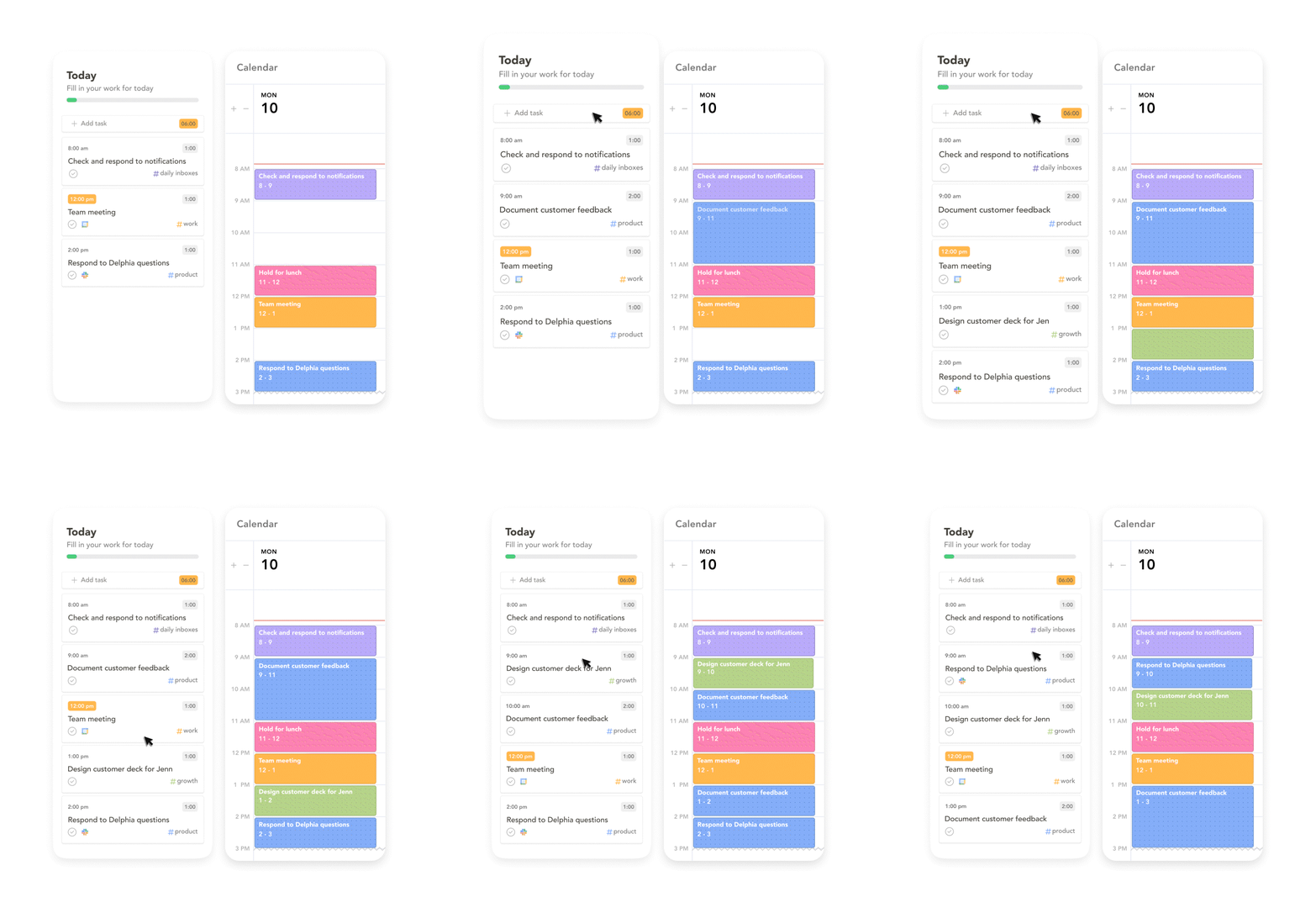
Sunsama handles my personal life. I pay for it because the integration with Gmail and Notion means I see everything in one glance. My calendar, my emails, my tasks from Notion—all in one dashboard. I can drag tasks around, moving them between days when my energy shifts.
That physical act of moving tasks matters more than I expected.
Reclaim AI manages my work calendar. It’s free, which matters when you’re paying for Sunsama. But more importantly, it auto-schedules based on my work patterns. I don’t decide when to do things. The tool decides, removing one layer of decision-making.
BeforeSunset AI runs my focus sessions. I use it for Pomodoro timers and white noise. When I need to work, I open this tool. The context tells my brain “This is focus time” without requiring conscious transition.
Each tool serves a distinct function. Together, they create a system that externalizes executive function rather than demanding I maintain it internally.
The Overlooked Power of Visual Task Management
I organize my plans, internal thoughts, and everything else by moving tasks around on a visual dashboard.
This isn’t just preference. It’s how my brain processes what needs to happen.
Research on cognitive load shows that increasing cognitive load reduces performance and brain network efficiency in ADHD individuals. But perceptual load—processing visual information—actually eliminates differences between ADHD and non-ADHD groups. In some cases, visual processing helps ADHD brains perform better.
When I drag a task from Tuesday to Wednesday in Sunsama, I’m not just rescheduling. I’m making time tangible. I’m seeing the consequence of my decision immediately. The visual feedback loop helps my brain understand what “moving this task” actually means.
Static lists don’t do this. They sit there, unchanging, demanding I hold the entire structure in my working memory while deciding what to do next.
Visual dashboards externalize that structure. The organization exists outside my head, which means I can use my cognitive energy for actual work instead of maintaining mental models.

How AI Tools Reduce Decision Fatigue (When Used Right)
AI tools help with ADHD productivity, but not in the way most articles suggest.
The benefit isn’t that AI “thinks for you.” The benefit is that AI removes micro-decisions that drain cognitive resources before you start working.
According to research on decision fatigue, ADHD brains burn out fast on micro-choices. The constant “where do I start” or “what comes first” derails everything. A survey of 1,859 adults with ADHD found that 56.59% struggle with procrastinating important tasks, while 42.28% have difficulty resisting distractions.
These challenges stem from executive dysfunction—the brain’s impaired ability to manage attention, regulate emotions, prioritize effectively, and maintain working memory under cognitive load.
I use Otter AI for meeting notes. Not because I can’t take notes, but because taking notes while processing conversation while tracking action items creates cognitive overload. Otter captures everything automatically. I can focus on the conversation. The decision about “Is this important enough to write down?” disappears.
I use Fathom for similar reasons during client calls. The AI generates summaries and action items. I review them later when I have cognitive capacity for processing.
The key insight: AI works best when it handles the scaffolding, not the thinking.
Research describes this as AI as scaffolding rather than replacement. Living with ADHD isn’t about lacking intelligence. It’s about lacking external systems that ADHD brains can lean on. AI builds those systems.
But there’s a warning here. Experts caution against over-reliance. If you use AI as a substitute for therapy or self-management, you risk creating dependence. The best outcomes happen when AI complements traditional support, not replaces it.

The Tools I Actually Use and Why
Here’s my current stack, organized by the executive function challenge each tool addresses:
For Time Blindness and Visual Planning
- Sunsama: Personal task management with calendar integration. I see my Gmail, Notion tasks, and calendar in one visual space. The ability to drag tasks between days helps me adapt when energy or priorities shift.
- Reclaim AI: Work calendar automation that’s particularly effective as Reclaim AI for teams. It schedules tasks based on my patterns and available time, coordinating across team calendars when needed. I don’t decide when to work on things. The tool decides.
- BeforeSunset AI: Focus sessions with Pomodoro timers and ambient sound. The context separation helps my brain transition into work mode.
For Working Memory and Information Capture (Essential ADHD Friendly Work Tools)
- Otter AI: Meeting transcription and note-taking. Captures everything automatically so I can focus on conversation rather than documentation.
- Notion: Acts as my external brain. Everything lives here—project notes, client information, article drafts, research. The integration with Sunsama means tasks flow between systems without manual transfer.
For Communication and Follow-Through
- HubSpot: Client relationship management designed for an ADHD brain. Automates follow-up reminders and tracks communication history—essential when working within the Philippine corporate landscape where relationship maintenance drives business success. I don’t rely on memory to know when I last contacted someone.
- Bouncer: Email verification before sending campaigns. Removes the decision-making around list cleaning and reduces anxiety about deliverability.
For Content Creation and Optimization
- RankPrompt: SEO content briefs that remove the “what should I write about” paralysis, particularly useful for self-publishing content marketing strategies. The structure exists before I start writing.
- Pressmaster AI: Content editing and optimization that reduces the cognitive load of revision. Instead of manually tracking formatting consistency and structural issues, the tool handles technical editing while I focus on strategic improvements.
For Learning and Skill Development
- LearnWorlds: Course platform for clients exploring online course creation. The structure helps me organize educational content in a way that reduces cognitive load for learners (many of whom also have ADHD).

What Makes a Tool Actually Worth Using
I evaluate new tools based on three criteria:
Does it reduce cognitive load or add to it? If a tool requires significant setup, daily maintenance, or constant decision-making, it’s creating work rather than reducing it. The best tools fade into the background.
Does it integrate with my existing systems? Standalone tools create friction. I need information to flow between systems automatically. If I have to manually transfer data, the tool adds cognitive load.
Does it address a specific executive function gap? Generic productivity tools rarely work for ADHD brains. I need tools built around how executive dysfunction actually manifests—time blindness, working memory limitations, task initiation challenges, decision fatigue.
One more consideration: Can I maintain this long-term?
Research suggests focusing on 2-3 core tools maximum. More tools mean more maintenance, more decision fatigue, and more breakdown opportunities. The best productivity application remains the one you use consistently.
This creates tension with my multi-tool approach. I’m aware of it. The difference is that my tools serve distinct functions rather than overlapping. I’m not maintaining multiple task managers. I’m using different tools for different contexts.
The Implementation Reality Nobody Talks About
Here’s what productivity articles don’t tell you: adopting new tools is hard when executive dysfunction is the problem you’re trying to solve.
You need executive function to implement tools that support executive function. It’s circular.
I handle this through implementation rituals—specific, repeatable patterns that reduce the cognitive load of starting.
For Sunsama, my ritual is: Open the app before checking email. Drag yesterday’s unfinished tasks to today. Review calendar. That’s it. Three steps, same order, every morning.
For BeforeSunset AI, the ritual is: Open the app when I sit down to write. Start a 25-minute timer. Choose ambient sound. The sequence tells my brain “This is focus time” without requiring conscious transition.
The rituals matter more than the tools themselves. Without consistent implementation patterns, even the best tools become digital clutter.

What I’d Tell Someone Starting From Scratch
Start with one tool that addresses your biggest executive function challenge.
Not the tool with the most features. Not the one everyone recommends. The one that solves your most persistent problem.
For me, time blindness was the biggest barrier. I couldn’t see time, so I couldn’t plan effectively. Visual time-blocking tools fixed this. Everything else built from there.
Give yourself permission to layer tools as you discover gaps. You’re not failing because one tool doesn’t solve everything. You’re building a system that works with your brain instead of against it.
And remember: the goal isn’t perfect productivity. The goal is sustainable productivity that doesn’t require constant cognitive effort to maintain.
My naturally messy brain needs external structure. These tools provide that structure. They don’t fix executive dysfunction. They work around it, creating systems that reduce cognitive load rather than demanding I overcome neurological differences through willpower.
That’s the real difference between tools that help and tools that just add complexity.
The best tools fade into the background, supporting your work without demanding attention themselves. They externalize the executive functions your brain struggles to maintain internally. They remove micro-decisions that drain cognitive energy before you start working.
And sometimes, they just make it fun to organize your day by dragging colorful blocks around a screen.
That matters more than it sounds.
Ready to Automate Your Workflow with AI Agents?
If you’re exploring building AI agents that reduce cognitive load and handle repetitive tasks, Blackbox AI offers a no-code platform for creating custom automation. Start building AI agents that work as your external executive function system.
Frequently Asked Questions
What makes a tool truly ADHD-friendly versus just marketed that way?
Genuinely ADHD-friendly tools address specific executive function challenges like time blindness, working memory limitations, or decision fatigue—not just offer colorful interfaces or gamification without reducing cognitive load.
Why use multiple similar tools instead of consolidating to one?
Context separation reduces cognitive filtering—when personal and work tasks appear in separate visual spaces, your brain doesn’t waste energy constantly categorizing information or maintaining multiple mental models simultaneously.
How do I know which executive function challenge to address first?
Identify your biggest productivity barrier: if you can’t visualize time, start with time-blocking tools; if you forget tasks immediately, focus on capture systems; if starting feels impossible, prioritize tools that break projects into concrete first steps.
Can AI tools replace traditional ADHD management strategies?
No. AI works best as scaffolding that complements therapy and self-management strategies, not as a replacement. Over-reliance on AI without addressing underlying executive function skills can create dependence.
How many productivity tools should someone with ADHD actually use?
Research suggests 2-3 core tools maximum to avoid maintenance overwhelm, but tools serving distinct functions (like separate work/personal contexts) create less cognitive load than multiple overlapping tools attempting the same task.

Maria is an accomplished digital marketing professional, specializing in content marketing and SEO. She's a neurodivergent who strives to raise awareness, and overcome the stigma that envelopes around mental health.




No Comment! Be the first one.